
LIVE REPAIR WORKFLOW

From intake to pickup, tracked in one tap

Create jobsheets, update repair status, print invoices and notify customers, all from your phone.
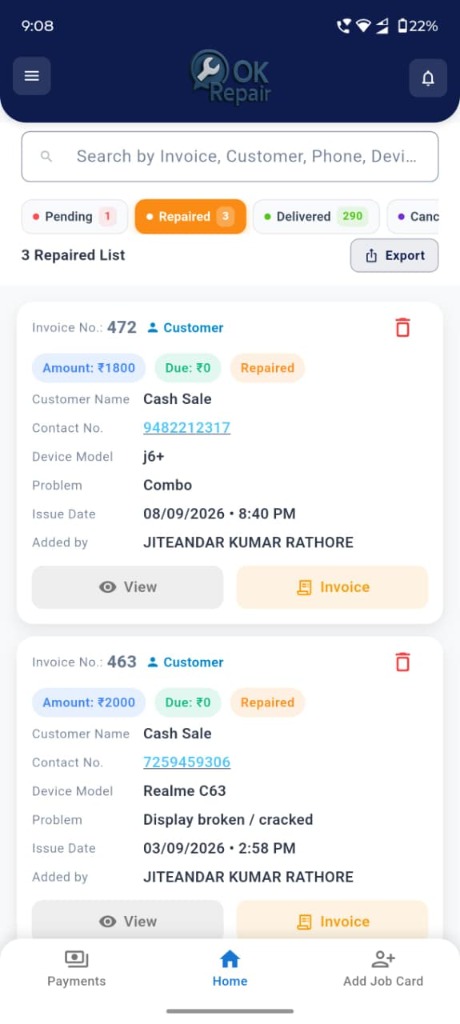
✓Pending●Repaired3Delivered
Jobsheet createdDevice intake logged
Invoice #472 ready₹1,800 · Due ₹0
Customer notifiedStatus change alert sent
SMS sent to customerYour device is ready for pickup
10,760Devices delivered
Export in one tapRepaired list to CSV

Made for every kind of service shop

Mobile repair Laptop & computer service Electronics GSM & accessories Appliance & water solutions
Why OK Repair

Leave the notebook behind

Most repair counters run on paper, memory and phone calls. Here is what changes.

Without OK Repair

  • Jobs written in notebooks that get lost
  • Customers calling to ask if their phone is ready
  • Forgotten pickups and unclear amounts
  • No idea which technician is doing what

With OK Repair

  • Every device logged with issue, price and photo
  • Status you can trust: Pending, Repaired, Delivered
  • Full repair history for every customer
  • Staff logins that only show the screens you allow
Features

Everything a busy counter needs

Simple tools that fit how repair shops really work.

Digital jobsheets

Log the device, the reported issue, the amount and a photo the moment it arrives. Find any job again in seconds.

Device model Reported issue Amount Device photo Intake date

Customer history

See every past repair for a customer and greet returning clients with confidence.

Live repair status

Move jobs from Pending to Repaired to Delivered, and keep customers updated by SMS.

PendingRepairedDelivered

Branded invoices

Your shop name, logo and address on every invoice, ready to share.

Staff access control

Give technicians their own login and choose which screens each role can see.

Jobsheets   Earnings
How it works

Up and running in three steps

Download the app

Install OK Repair from Google Play on your Android phone.

Register and log in

Create your shop account in the app with your shop name, owner and location.

Pick a plan, create jobsheets

Choose the jobsheets you need, log devices as they arrive and hand over with an invoice.

1,755partner shops
14,013customers on the platform
10,760repair jobs delivered
Pricing

Plans that grow with your shop

Pay for the jobsheets you need. Register in the app, then pick the plan that fits your shop.

Starter
₹139
200 jobsheets
  • Unlimited repair jobs
  • Customer database with history
  • View repair job history
  • Generate basic invoices
  • Customer management
Get Starter
Most popular Standard
₹349
500 jobsheets
  • Everything in Starter
  • Staff login with role-based access
  • Customer management
  • Generate basic invoices
  • Unlimited repair jobs
Get Standard
Premium
₹1,399
2,000 jobsheets
  • Customer management
  • Generate basic invoices
  • SMS functionality
  • View repair job history
  • Customer database with history
Get Premium
Unlimited
₹1,999
1 year, unlimited jobsheets
  • Unlimited jobsheets for 1 year
  • Customer database
  • Staff login
  • Repair management
Get Unlimited
FAQ

Common questions

What is a jobsheet?

A jobsheet is the record for one device that comes in for repair: who brought it, what is wrong, the amount and its status until it is delivered.

Can my technicians use it too?

Yes. Plans with staff login let you add technicians, who log in to the app with their own access, and you control which screens each role can see.

How do I use OK Repair?

Download the OK Repair app, register your shop and log in from your phone. Everything runs in the app.

Is there an iPhone version?

OK Repair is currently available on Google Play for Android only.

Can I add device photos?

Yes. You can attach a photo to a jobsheet when the device comes in and see it later in the job list.

Can my invoices show my own logo?

Yes. Your shop name, logo and address appear on invoices and customer communications.

How do I get started?

Download the app from Google Play, register your shop, choose a plan and create your first jobsheet. Contact us using the details below if you need help.

Download the OK Repair app

Register your shop and log in from your phone in minutes.

Get it onGoogle Play